serving the solutions day and night

Pages

Showing posts with label xslt. Show all posts

Saturday, June 8, 2013

Retrieve Multiple Dynamics CRM 2011 Entity Records from BizTalk 2010 Server

Retrieve Multiple Dynamics CRM 2011 Entity Records from BizTalk 2010 Server
1)Create new map (MCRM_List.btm)

2) Added <Fetch><Query/></Fetch> schema in the SAuditXML.xml schema

3)Select Source Schema (SAuditXML), Desitnation Schema(DNS_BTS_CRM.organixationservice_schemas_microsoft_com_xrm_2011_contracts_services -> RetrieveMultiple)

4)Make Query(source) link to FetchExpression->Query(Destination)
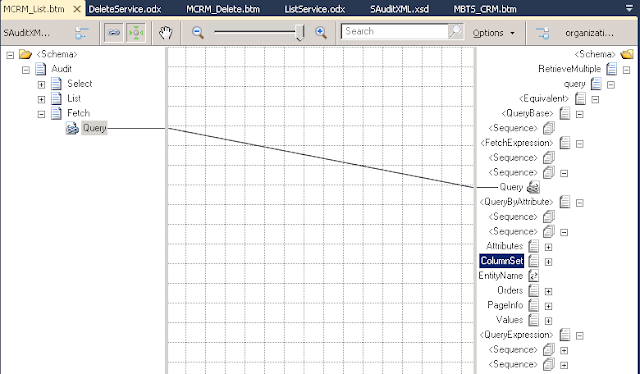

Create/Update/Delete Dynamics CRM 2011 Entity Record from BizTalk 2010 Server

Create Dynamics CRM 2011 Entity Record from BizTalk 2010 Server

1)Create new map (MCRM_Create.btm)

2)Select Source Schema (SAuditXML), Desitnation Schema(DNS_BTS_CRM.organixationservice_schemas_microsoft_com_xrm_2011_contracts_services -> Create)

3)Rename Page name (Enity), make EnityName(source) link to LogicalName(Destination)


Thursday, June 6, 2013

Dynamics CRM 2011 and BizTalk 2010 Server Integration - Exception


Exception 1
The formatter threw an exception while trying to deserialize the message: There was an error while trying to deserialize parameter http://schemas.microsoft.com/xrm/2011/Contracts/Services:entity. The InnerException message was 'There was an error deserializing the object of type Microsoft.Xrm.Sdk.Entity. End element 'value' from namespace 'http://schemas.datacontract.org/2004/07/System.Collections.Generic' expected. Found element 'Value' from namespace 'http://schemas.microsoft.com/xrm/2011/Contracts'. Line 1, position 4190.'. Please see InnerException for more details.

Solution
Data Type is wrong.

For example, In CRM attribute type is int, but in BizTalk Schema contains string and in the Map, Script Functionid contains <xsl:attribute name="xsi:type"><xsl:value-of select="'xs:string'" /> , the CRM will throw the above error.

Change to  int in the schema and <xsl:attribute name="xsi:type"><xsl:value-of select="'xs:int'" /> in the Map

Saturday, January 12, 2013

MS Dynamics CRM Web Resources

Web resources are virtual files that are stored in the CRM database and that you can retrieve by using a unique URL address. Solution -> Entities -> Web Resource

Limitations of Web Resources
Web resource does not supports ASP.NET(.aspx or asmx) page to execute code on the server. Web resources are either static files or files with code that is processed client-side by the browser.

Web resources are only available by using the CRM web application security context. Only licensed CRM users who have the necessary privileges can access them.

Size Limitations - The maximum size of files that can be uploaded is determined by the Organization.MaxUploadFileSize property.
Settings -> System -> Administration -> System Settings -> E-mail tab -> Maximum file size (default 5 mb). This setting limits the size of files that can be attached to email messages, notes, and web resources.
Web Resource Properties - Name, Display Name, Description, Type, Language