serving the solutions day and night

Pages

Saturday, June 8, 2013

Retrieve Multiple Dynamics CRM 2011 Entity Records from BizTalk 2010 Server

Retrieve Multiple Dynamics CRM 2011 Entity Records from BizTalk 2010 Server
1)Create new map (MCRM_List.btm)

2) Added <Fetch><Query/></Fetch> schema in the SAuditXML.xml schema

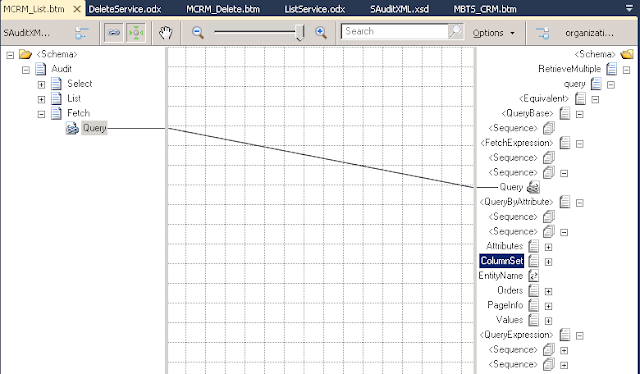
3)Select Source Schema (SAuditXML), Desitnation Schema(DNS_BTS_CRM.organixationservice_schemas_microsoft_com_xrm_2011_contracts_services -> RetrieveMultiple)

4)Make Query(source) link to FetchExpression->Query(Destination)

Create/Update/Delete Dynamics CRM 2011 Entity Record from BizTalk 2010 Server

Create Dynamics CRM 2011 Entity Record from BizTalk 2010 Server

1)Create new map (MCRM_Create.btm)

2)Select Source Schema (SAuditXML), Desitnation Schema(DNS_BTS_CRM.organixationservice_schemas_microsoft_com_xrm_2011_contracts_services -> Create)

3)Rename Page name (Enity), make EnityName(source) link to LogicalName(Destination)


Thursday, June 6, 2013

Dynamics CRM 2011 and BizTalk 2010 Server Integration - Exception


Exception 1
The formatter threw an exception while trying to deserialize the message: There was an error while trying to deserialize parameter http://schemas.microsoft.com/xrm/2011/Contracts/Services:entity. The InnerException message was 'There was an error deserializing the object of type Microsoft.Xrm.Sdk.Entity. End element 'value' from namespace 'http://schemas.datacontract.org/2004/07/System.Collections.Generic' expected. Found element 'Value' from namespace 'http://schemas.microsoft.com/xrm/2011/Contracts'. Line 1, position 4190.'. Please see InnerException for more details.

Solution
Data Type is wrong.

For example, In CRM attribute type is int, but in BizTalk Schema contains string and in the Map, Script Functionid contains <xsl:attribute name="xsi:type"><xsl:value-of select="'xs:string'" /> , the CRM will throw the above error.

Change to  int in the schema and <xsl:attribute name="xsi:type"><xsl:value-of select="'xs:int'" /> in the Map

Tuesday, June 4, 2013

Dynamics CRM 2011 and BizTalk 2010 Server Integration - Handling Fault Exception

Dynamics CRM 2011 and BizTalk 2010 Server Integration - Handling Fault Exception

1)Refer the previous blog Querying Dynamics CRM 2011 Entrity Record from BizTalk 2010 Server

 
2)Right click the project -> Select Add -> New Item ->  Schema (SFault.xsd) -> Press 'Add' button


Monday, June 3, 2013

Select Dynamics CRM 2011 Entity Record from BizTalk 2010 Server

Dynamics CRM 2011 BizTalk 2010 Server Integration - Select Dynamics CRM 2011 Entity Record from BizTalk 2010 Server

Step 1 - Create Schema and Orchestration

1)Import Dynamics CRM 2011 Organization Service SOAP Protocol to BizTalk Server 2010
   Create New Project (CRMORGSOAP.dll) and add refernece to this project.

2)Right click the project -> Signing -> Check 'Sign the assembly' -> Create <New> 'Strong Name     Key' or <Browse> existing one
  Select Deployment -> Enter Application Name ('DNS_BTS_CRM') -> Restart Host Instances - True
 
3)Right click the project -> Select Add -> New Item ->  Schema (SAudit.xsd) -> Press 'Add' button
  <Select> used for pass entity name and record id to CRM.
  <List> used for response result from CRM.
 

Wednesday, May 29, 2013

Import Dynamics CRM 2011 Organization Service SOAP Protocol into BizTalk Server 2010

Import Dynamics CRM 2011 Organization Service SOAP Protocol to BizTalk Server 2010

1)Open Visual Studio 2010, Select File menu -> New -> Project -> 'Empty BizTalk Server Project'

2)Right click the project, Select Add menu -> 'Add Generated Items...'
 
3)Select 'Consume WCF Service', press 'Add' button

Thursday, May 16, 2013

Intellisense in Dynamics CRM 2011 Customizations using Visual Studio

Intellisense in Dynamics CRM 2011 Customizations using Visual Studio

Goto Visual Studio -> Select XML Tab -> Select Schemas...


'XML Schemas' window will be popup, Press 'Add' button to add crm sdk schemas

(CRM2011\sdk_5.0.9690.3339\schemas\)

Tuesday, May 7, 2013

BizTalk

BizTalk Server is an enterprise service bus (ESB) that can connect/communicate to various business servers. Biztalk is MS Integration and connectivity server solution. It provides the following functions: Enterprise Application Integration, Business Process Automation, Business-To-Business Communication, Message broker, and Business Activity Monitoring. BizTalk connects diverse system.

Dynamics CRM Workflow

Dynamics CRM Workflow
Typical workflow actions include sending an email message, creating a task, and updating a data field on a record.
Dynamics CRM workflow uses the Windows Workflow Foundation framework for its core infrastructure.
Dynamics CRM workflow is Asynchronous Processing Service.
Dynamics CRM workflow processes in one of three ways: Manually by the user, Automatically from a trigger event & From another workflow
Workflow Process Security - Creating and editing workflow processes & Running workflow processes (Manual or Automatic).
Settings -> Process Center -> Processes

Create a workflow process
Enter a process name, select entity, select Workflow as the category and select new bank process, Press OK


Monday, May 6, 2013

Dynamics CRM Diagnostics Page

Use the diagnostics page to Capture Network Performance
http://<YourCRMServerURL>/tools/diagnostics/diag.aspx
click the Run button to start the tests.
This page is available for both CRM Online and OnPremise.
 http://www.microsoft.com/en-us/download/details.aspx?id=23261