serving the solutions day and night

Pages

Showing posts with label C#. Show all posts

Monday, October 23, 2017

Visual Studio 2017 - C# 7.0 Features


1. Out Variables
static void Main(string[] args)
{
    string first = "M";
    string last = "K";
    string name = string.Empty; //have to pre-declare before using the out.
    GetName(first, last, out name);

    //In c# 7.0, you can declare in the variable line
    GetName(first, last, out string name1);
    GetName(first, last, out var name2); ////use var instead of string
}

static void GetName(string first, string last, out string name)
{
    name = first + " " + last;
}

Friday, April 1, 2016

Convert JSON to Object using Json.NET

sample json file
[{"empNumber":"123456","primaryName":{"firstName":"FN","lastName":"LN"},"disability":false,"otherNames":[{"firstName":"FN","lastName":"LN1"},{"firstName":"FN","lastName":"LN2"}],"homeAddress":{"addressLine1":"1234 Python Java Rd","city":"Bellevue","state":"WI","postalCode":"628204"}},{"empNumber":"7890","primaryName":{"firstName":"1FN","lastName":"1LN"},"disability":true,"otherNames":[{"firstName":"1FN","lastName":"1LN1"},{"firstName":"1FN","lastName":"1LN2"}],"homeAddress":{"addressLine1":"5869 Dotnet CRM St","city":"Chicago","state":"NE","postalCode":"567567"}}]

Download Json.NET dll from http://www.newtonsoft.com/json


Thursday, October 1, 2015

.NET Web Configuration - Access Service by both AJAX & SOAP.

Web Configuration
<?xml version="1.0" encoding="UTF-8"?>
<configuration>
  <connectionStrings>
    <add name="" />
  </connectionStrings>
  <appSettings>
    <add key="aspnet:UseTaskFriendlySynchronizationContext" value="true" />
  </appSettings>
  <system.web>
    <compilation debug="true" targetFramework="4.5" />
    <httpRuntime targetFramework="4.5" />
  </system.web>

Tuesday, February 12, 2013

Get CRM PickList & Global OptionSet using c#

using System.ServiceModel.Description;
using Microsoft.Xrm.Sdk;
using Microsoft.Xrm.Sdk.Client;
using Microsoft.Xrm.Sdk.Query;
using Microsoft.Xrm.Sdk.Messages;
using Microsoft.Xrm.Sdk.Metadata;

Uri OrganizationUri = new Uri(System.Configuration.ConfigurationManager.AppSettings["CRM_Organization_URI"].ToString());
Uri HomeRealmUri = null;
Dictionary<String, String> dicState = new Dictionary<String, String>();
Dictionary<String, String> dicSuffix = new Dictionary<String, String>();

Thursday, November 29, 2012

SharePoint 2010 - Create List, Update Document, Link to Other List using c#

This post contains mostly c# code. Code contains to create/update List, folder, link to other list and update word document.

using Microsoft.SharePoint.Client;

namespace CreateReportForPlacesV2
{
    public class SharePoint
    {
        // Defines a private SharePoint site, like "http://<Server Name>/"
        private string spSite = System.Configuration.ConfigurationManager.AppSettings["SPSite"].ToString();

        // Defines a private SharePoint document, like "Reporting Documents".
        private string spDoc = System.Configuration.ConfigurationManager.AppSettings["SPReportingDocument"].ToString();

        // Defines a private SharePoint place list name, like "Place Details".
        private string spPList = System.Configuration.ConfigurationManager.AppSettings["SPPlaceDetailsList"].ToString();

        // Defines a private SharePoint C list is used to link to Place list details.
        private string spCList = System.Configuration.ConfigurationManager.AppSettings["SPCList"].ToString();

Tuesday, November 27, 2012

CRM Dynamics 2011 - Dynamic Entity using Service Data Context

Refer the blog, how to create CRM Entites and Service Data Context http://makdns.blogspot.com/2012/11/crmsvcutilexe-crm-dynamics-2011-code.html

Add the CRM.Entities.cs file to your project.

Insert, Update, Delete, View and Select Entities list using c#.

Monday, November 26, 2012

CRM Dynamics 2011 - Dynamic Entity

Using C# and IOrganizationService Web Service - A Simple Application will display, add, modify and delete Entity records.

Form design

<div>
        <strong>Contact Form - <asp:Button ID="Insert" runat="server" OnClick="Insert_Click" Text="Insert" /><br /></strong>
        <asp:Literal ID="litViewAll" runat="server"></asp:Literal><br />
        <asp:Panel runat="server" ID="panDetails" Visible="false">
        First Name<asp:TextBox ID="txtFirstName" runat="server"></asp:TextBox><br />
        Last Name<asp:TextBox ID="txtLastName" runat="server"></asp:TextBox><br />
        Address<asp:TextBox ID="txtAddress" runat="server"></asp:TextBox><br />
        City<asp:TextBox ID="txtCity" runat="server"></asp:TextBox><br />
        Zip<asp:TextBox ID="txtZip" runat="server"></asp:TextBox><br />
        State<asp:DropDownList ID="ddlSList" runat="server" AppendDataBoundItems="true">
            <asp:ListItem Selected="True" Text="Select SList" Value="00000000-0000-0000-0000-000000000000"/>
        </asp:DropDownList><br />
        Municipality Name<asp:DropDownList ID="ddlJList" runat="server" AppendDataBoundItems="true">
            <asp:ListItem Selected="True" Text="Select MList" Value="00000000-0000-0000-0000-000000000000"/>
        </asp:DropDownList><br/>      
        <asp:Button ID="CreateNew" runat="server" OnClick="CreateNew_Click" Text="Create" />
        <asp:Button ID="Delete" runat="server" OnClick="Delete_Click" Text="Delete" />
        <asp:Button ID="Update" runat="server" OnClick="Update_Click" Text="Update" /><br />
        </asp:Panel>
        </div>

Wednesday, November 21, 2012

IncludeExceptionDetailInFaults - Display Hidden Error

Create a simple web application to add contact data into the CRM system using c# and IOrganizationService Web Service.

1)Create Empty web application

2)Add References
microsoft.xrm.sdk.dll
microsoft.crm.sdk.proxy.dll
System.Runtime.Serialization
System.ServieModel

Monday, July 30, 2012

LDAP (Active Directory) Programming with C#

  1. .NET Support 2 sets of classes of Active Directory(AD) operations.
  2. System.DirectoryServices
    Older class, supports from .net 1.0. Supports all AD operations (setting password, enable/disable account, reterive AD objects).
  3. System.DirectoryServices.AccountManagement
    Newer version (>=3.5), easier to manage AD operations. Usign UserPrincipal object to access LDAP object.

Tuesday, February 7, 2012

Display SSRS Report in ASP.NET Web Page

1)Open VS 2010 and Create a ASP.NET Web Application project.

2)Add a ScriptManager (AJAX Externsions), ReportViewer (Reporting) and Button (Standard) control from the toolbox in the Default.aspx page.

3)Double Click on the button, to add the following code in the button event.
protected void Button1_Click(object sender, EventArgs e)
{
ReportViewer1.ProcessingMode = Microsoft.Reporting.WebForms.ProcessingMode.Remote;
ReportViewer1.ServerReport.ReportServerUrl = new Uri("http://localhost/ReportServer");
ReportViewer1.ServerReport.ReportPath = "/Report Project2/Report4";
ReportViewer1.ServerReport.Refresh();
}

Saturday, December 17, 2011

Table-valued parameters

Table-valued parameters - allows you to use multiple rows of data in T-SQL statments or send a table as a parameter to functions and stored procedures. It benefits such as flexibility, better performance than other methods of passing list of parameters adn reduce round trips to the server.The user-defined table type used for the table-valued parameters.
(Programmability->Types->User-Defined Table Types->dbo.StocksType)

DROP TABLE Stocks

CREATE TABLE Stocks(StocksName varchar(100), Qty int, Price dec(10,2))

CREATE TYPE StocksType AS TABLE(StocksName varchar(100), Qty int, Price dec(10,2))


CREATE PROCEDURE uspStocks
@tvp StocksType READONLY
AS
BEGIN
SET NOCOUNT ON
INSERT INTO Stocks(StocksName, QTY, Price)
SELECT StocksName, QTY, Price FROM @tvp
END;
GO

DECLARE @v as StocksType
INSERT INTO @v(StocksName, QTY, Price) VALUES('MSFT',100, 36.67), ('SUN',100, 26.67)

EXEC uspStocks @v;
GO

SELECT * FROM Stocks


DataTable dt = new DataTable("Stocks");

dt.Columns.Add("StocksName", typeof(string));
dt.Columns.Add("Qty", typeof(int));
dt.Columns.Add("Price", typeof(decimal));

dt.Rows.Add("GOO", 100, 45.78);
dt.Rows.Add("APP", 50, 35.78);

SqlConnection conn= new SqlConnection("Data Source=local,1433;Initial Catalog=master;Integrated Security=True");
conn.Open();
SqlCommand cmd = new SqlCommand("uspStocks", conn);
cmd.CommandType = CommandType.StoredProcedure;
SqlParameter param = new SqlParameter("tvp", SqlDbType.Structured);
param.Value = dt;
cmd.Parameters.Add(param);
cmd.ExecuteNonQuery();
conn.Close();

https://msdn.microsoft.com/en-us/library/bb675163%28v=vs.110%29.aspx

Sunday, May 8, 2011

Debug Directive

If the code is only for development environment not in the live or release environment use Debug Directive or Conditional attribute For exmple, Some of the code only run while in debugggin mode, but you don't want to shift to production server or code to run while in live

If the application/compilation running in the debug mode, then the debug code will execute, but if you complied the same code in the release mode, then debug code will not execute.

In Debug environment, output is
If Debug
No If
Conditional Debug
No Conditional

Saturday, September 18, 2010

C# - Program Structure, Data Types, Type Casting (Conversion)

Program Structure
//the using keyword is used to include the System namespace in the program.
using System;
//the namespace declaration. A namespace is a collection of classes. The HelloWorldApplication namespace contains the class HelloWorld.
namespace HelloWorldApplication
{
   //a class declaration, the class HelloWorld contains the data and methods
   class HelloWorld
   {
      // the mehod declaration
      void Print()
      {
//Comments
/*...*/
//
      }
   }
}
C# is case sensitive.
All statements and expression must end with a semicolon (;).

Data Types
Value types 
- value type variables can be assigned a value directly.
- bool, byte, char, decimal, double, float, int, long, sbyte, short, uint, ulong, ushort
- get the exact size of a type or a variable - sizeof(int)
Reference types
- The reference types do not contain the actual data stored in a variable, but they contain a reference to the variables. in other words, they refer to a memory location.
- Using multiple variables, the reference types can refer to a memory location. If the data in the memory location is changed by one of the variables, the other variable automatically reflects this change in value.
- object, dynamic, and String.
- object obj = 100; //it will assign ar comiple time
- dynamic d = 100; //it will assign at run time
- String s ="C# code"; or @"c# code";
Pointer types (Unsafe Codes)
- store the memory address of another type.
- char* cptr;

Type Conversion (Type Casting) -  converting one type of data to another type, 2 forms
  - Implicit type conversion
  - performed by in a type-safe
  - int i = 123456789;
   long l = il
  - Derived d = new Derived();
   Base b = d;
  - Explicit type conversion
  - conversions are done explicitly  by users using the pre-defined functions. Explicit conversions require a cast operator.
  - double d = 1234.67;
   int i= (int)d; // 1234
  - type conversion methods -   ToBolean, ToByte, ToChar, ToString()
  - int i = 75; i.ToString();  

C# - System.Reflection

System.Reflection -  Reflection objects are used for obtaining type information (attribute, assembly, late binding methods & properties  at run time.

namespace UnitTestVM
{
    [TestClass]
    public class ReflectionClass
    {
        public static int Id;
        public static string Name;

        public static void ReflectionMethod()
        {
            Type type = typeof(ReflectionClass); // type pointer
            Debug.WriteLine("Fields Info");
            FieldInfo[] fields = type.GetFields(); // Obtain all fields
            foreach (var field in fields) // Loop through fields
            {
                string name = field.Name; // attribute name
                object obj = field.GetValue(null); // attribute value
                System.Type typ = obj.GetType();  //attribute type
                Debug.WriteLine(name + " = " + obj + ", " + typ );
            }

            Debug.WriteLine("Assembly Info");
            System.Reflection.Assembly info = typeof(System.Int32).Assembly;
            Debug.WriteLine(info); //get assembly information

            Debug.WriteLine("Custom Attributes");
            System.Reflection.MemberInfo member = typeof(ReflectionClass);
            object[] att = member.GetCustomAttributes(true);
            for (int i = 0; i < att.Length; i++) Debug.WriteLine(att[i]);
           
            Debug.WriteLine("Method Info");
            MethodInfo[] mi = type.GetMethods();
            for (int i = 0; i < mi.Length; i++) Debug.WriteLine(mi[i]);
           
            Debug.WriteLine("Member Info");
            MemberInfo[] memi = type.GetMembers();
            for (int i = 0; i < memi.Length; i++) Debug.WriteLine(memi[i]);
           
            Debug.WriteLine("Property Info");
            PropertyInfo[] pi = type.GetProperties();
            for (int i = 0; i < pi.Length; i++) Debug.WriteLine(pi[i]);
        }
    }

 
    [TestClass]
    public class SOAPTest
    {
        [TestMethod]
        public void ReflectionTestMethod()
        {
            ReflectionClass.Id = 123;
            ReflectionClass.Name = "C#";
            ReflectionClass.ReflectionMethod(); // Invoke reflection methods

        }
    }
}  

Fields Info
Id = 123, System.Int32
Name = C#, System.String
Assembly Info
mscorlib, Version=4.0.0.0, Culture=neutral, PublicKeyToken=b77a5c561934e089
Custom Attributes
Microsoft.VisualStudio.TestTools.UnitTesting.TestClassAttribute
Method Info
Void ReflectionMethod()
System.String ToString()
Boolean Equals(System.Object)
Int32 GetHashCode()
System.Type GetType()
Member Info
Void ReflectionMethod()
System.String ToString()
Boolean Equals(System.Object)
Int32 GetHashCode()
System.Type GetType()
Void .ctor()
Int32 Id
System.String Name
Property Info

Friday, September 10, 2010

C# - Generics, Boxing, Unboxing

Generics
- C# is a strongly typpe language, when using C# you should declare a type prior to storing data in it.
- Generics types to eliminate redundant code, type safety, code re-usability and performance.
- create generic interfaces, classes, methods, events and delegates.
- Generic can be defined by putting the <T> sign after the class or method name. instead of "T" you can use any word.
- Generic data type obtained at run-time by using reflection.
- Generics allow you to write a class or method that can work with any data type.
- System.Collection.Generic namespace contains Collection<T>, Dictionary<TKey, TValue>, List<T>, Queue<T>, Stack<T>

Type Safety Example
ArrayList obj = new ArrayList();
obj.Add(50);
obj.Add("Dog");
obj.Add(new TestClass());

foreach(int i in obj) Console.WriteLine(i);
//the code will compile, but run time iteration will through 'InvalidCastException' occurred when it print "Dog", bcz it is not integer, the code will print 50.

GenericClass<int> intObj = new GenericClass<int>();
intObj.setItem(0, 50);
intObj.setItem(1, "Dog"); //compiler error, the compiler doesn't compile the code.

Performance
Generics are faster than other collections such as ArrayList. In non-generic colloection, boxing and unboxing overhead when a value type is converted to reference type and vice-versa.

ArrayList  obj = new ArrayList();
obj.Add(50);    //boxing- convert value type to reference type
int x= (int)obj[0]; //unboxing

GenericClass<int>, an int type is generated dynamically from the compiler, boxing and unboxing no longer occurs.

GenericClass<int> obj = new GenericClass<int>();
obj.Add(50);    //No boxing
int x= obj[0]; // No unboxing

Code reuse - A Generic class can be defined once and can be instantiated with many different types.
GenericClass<int> intObj = new GenericClass<int>();
GenericClass<char> charObj = new GenericClass<char>();        

Generic Class Example
using System;
using System.Collections.Generic;

namespace GenericClassApplication
{
   public class GenericClass<T>
   {
      private T[] obj = new T[5]; // define an Array of Generic type with length 5
   
      public T getItem(int index)
      {
         return obj[index];
      }
   
      public void setItem(int index, T value)
      {
         obj[index] = value;
      }
   }
 
   class Program
   {
      static void Main(string[] args)
      {
//instantiate generic with int
         GenericClass<int> intObj = new GenericClass<int>();
         for (int i = 0; i < 5; i++) intObj.setItem(i, i*2);
         for (int i = 0; i < 5; i++) Console.WriteLine(intObj.getItem(i)); //0 2 4 6 8
       
         //instantiate generic with char
         GenericClass<char> charObj = new GenericClass<char>();      
         for (int i = 0; i < 5; i++) charObj.setItem(i, (char)(i*2));
         for (int i = 0; i < 5; i++) Console.WriteLine(charObj.getItem(i));
      }
   }
}


Generic Methods Example
using System;
using System.Collections.Generic;

namespace GenericMethodApplication
{
   class Program
   {
      static void Swap<T>(ref T a, ref T b)
      {
         T temp;
         temp = a;
         a = b;
         b = temp;
      }
   
      static void Main(string[] args)
      {
         int a=10, b=20; //a = 10, b = 20
Swap<int>(ref a, ref b); //a = 20, b = 10

         char i = 'I', j ='J';
         Swap<char>(ref i, ref j); //i = 'J', j = 'I'
      }
   }
}

Generic Delegates Example
using System;
using System.Collections.Generic;

delegate T GenericDelegate<T>(T n);
namespace GenericDelegateApplication
{
   class DelegateClass
   {
      static int n = 10;
      public static int Sum(int i)
      {
         n += i;
         return n;
      }
   
      public static int Times(int i)
      {
         n *= i;
         return n;
      }
      public static int getValue()
      {
         return n;
      }
   
      static void Main(string[] args)
      {
         //create delegate instances
         GenericDelegate<int> gd1 = new GenericDelegate<int>(Sum);
         GenericDelegate<int> gd2 = new GenericDelegate<int>(Times);
       
         gd1(5); //calling the methods using the delegate objects,
         getValue(); //15
       
         gd2(2);
         getValue(); //30
      }
   }
}

Boxing - Boxing is used to store value types in the garbage-collected heap. A referece type is allocated on the heap.
int i = 123;
object o = i; //implicit conversion of a value type to the reference type (object).

stack heap

i
-----
| 23 |
-----
int i=123;

o
---                -----
|     |--------->  |int |
---                |----|
object o =i;     |123 |
       -----

Unboxing -  an explicit conversion from the reference type(object) to a value type. A value type is allocated on the stack
int j = int(o);

j
-----
| 23 |
-----
int j =(int)o;

Monday, August 23, 2010

SQL Server and MySQL Database Models in a C#.NET Application - Part 2

Properties
#region "Properties"
public DataSet RecordList
{
  get { return dsList; }
  set { dsList = value; }
}
#endregion "Properties"

Tuesday, August 10, 2010

SQL Server and MySQL Database Models in a C#.NET Application - Part 1

Develop a C#.NET web application using multiple database using SQL Server 2005/2008 and MySQL 5.1. I got the requirements from one of my client, web application should support both SQL Server and MySQL database. Where ever my client want to install the application to go with either any one of SQL Server or MySQL database setup.

Tuesday, July 20, 2010

Executing MySQL Stored Procedure using C#.NET - Part 2

In this blog contains business layer code and error description.

Business Layer
Class Admin - used to call Stored Procedure class, get result and pass to the client page

Executing MySQL Stored Procedure using C#.NET - Part 1

In this blog is going to explain how to get list of records, single record detail and insert/modify/delete records from MySQL stored procedure using C#.NET code. Blog contains information about MySQL table structure, stored procedure, C#.NET code and Error.

Monday, June 14, 2010

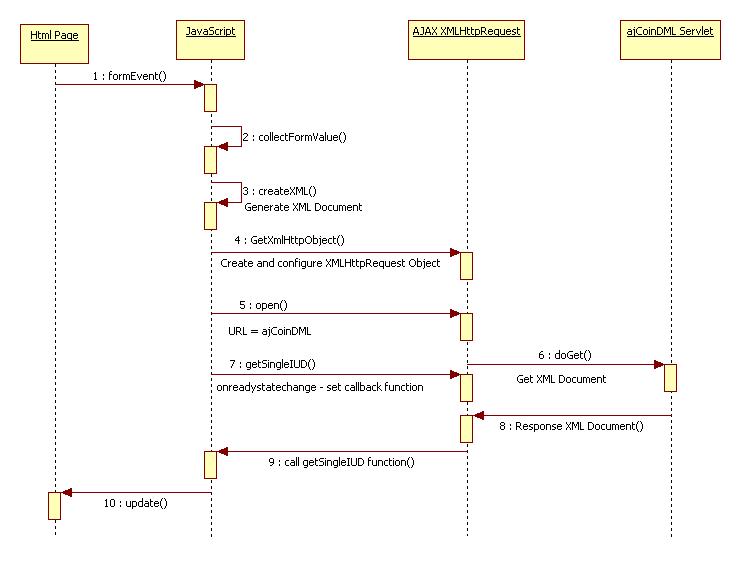
AJAX, Send XML Request/Response Using ASP.NET ,C# - Part 4

What is Ajax - More detail read Ajax Blog
1)Ajax are HTML, DOM, CSS, XML, JavaScript and XMLHttpRequest.
2)Submit Request and Get Server Response without doing page refresh.
3)Do the Asynchronous call to the server and get response from it.

This blog is going to explain
1)Send a XML request from Ajax to ASP.NET using C#.
2)Receive a XML Response from ASP.NET using C#to Ajax.


View Sequence Diagram for AJAX
View AJAX Flow Diagram