serving the solutions day and night

Pages

Showing posts with label catch exception. Show all posts

Saturday, June 8, 2013

Retrieve Multiple Dynamics CRM 2011 Entity Records from BizTalk 2010 Server

Retrieve Multiple Dynamics CRM 2011 Entity Records from BizTalk 2010 Server
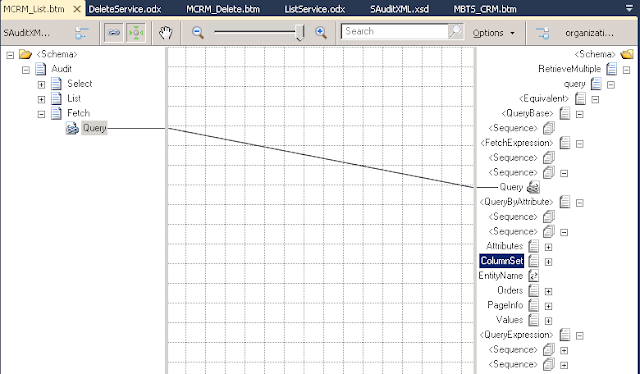
1)Create new map (MCRM_List.btm)

2) Added <Fetch><Query/></Fetch> schema in the SAuditXML.xml schema

3)Select Source Schema (SAuditXML), Desitnation Schema(DNS_BTS_CRM.organixationservice_schemas_microsoft_com_xrm_2011_contracts_services -> RetrieveMultiple)

4)Make Query(source) link to FetchExpression->Query(Destination)

Thursday, June 6, 2013

Dynamics CRM 2011 and BizTalk 2010 Server Integration - Exception


Exception 1
The formatter threw an exception while trying to deserialize the message: There was an error while trying to deserialize parameter http://schemas.microsoft.com/xrm/2011/Contracts/Services:entity. The InnerException message was 'There was an error deserializing the object of type Microsoft.Xrm.Sdk.Entity. End element 'value' from namespace 'http://schemas.datacontract.org/2004/07/System.Collections.Generic' expected. Found element 'Value' from namespace 'http://schemas.microsoft.com/xrm/2011/Contracts'. Line 1, position 4190.'. Please see InnerException for more details.

Solution
Data Type is wrong.

For example, In CRM attribute type is int, but in BizTalk Schema contains string and in the Map, Script Functionid contains <xsl:attribute name="xsi:type"><xsl:value-of select="'xs:string'" /> , the CRM will throw the above error.

Change to  int in the schema and <xsl:attribute name="xsi:type"><xsl:value-of select="'xs:int'" /> in the Map


Tuesday, June 4, 2013

Dynamics CRM 2011 and BizTalk 2010 Server Integration - Handling Fault Exception

Dynamics CRM 2011 and BizTalk 2010 Server Integration - Handling Fault Exception

1)Refer the previous blog Querying Dynamics CRM 2011 Entrity Record from BizTalk 2010 Server

 
2)Right click the project -> Select Add -> New Item ->  Schema (SFault.xsd) -> Press 'Add' button