The site map is xml included in a solution’s customizations file. Create a solution specifically for site map and application ribbon changes.
Use XML Notepad 2007 to edit XML
The default site map that you export does not include any of the following elements: Title, Titles, Description, or Descriptions. Dynamics CRM doesn’t require these elements for the six default application areas, but they are required for new areas. The Title, Titles, Description, and Descriptions elements apply to the Area, Group, and SubArea elements.
The Descriptions elements appear only in the Outlook client; the Titles elements appear in both the web and Outlook clients.
http://<crmserver>/<organizationname>/tools/solution/import/SolutionImportWizard.aspx.
Always export the latest site map and create a backup copy before making any edits.
Entity Display Areas
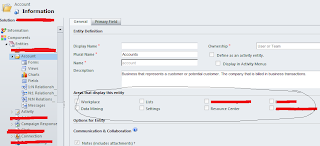
<SiteMap>
<SiteMap>
<Area>
<Group>
<SubArea/>
<Privilege/>
</SubArea>
</Group>
</Area>
</SiteMap>
</SiteMap>
<SiteMap>
<Area>
<Group>
<SubArea/>
<Privilege/>
</SubArea>
</Group>
</Area>
</SiteMap>
</SiteMap>
Use XML Notepad 2007 to edit XML
The default site map that you export does not include any of the following elements: Title, Titles, Description, or Descriptions. Dynamics CRM doesn’t require these elements for the six default application areas, but they are required for new areas. The Title, Titles, Description, and Descriptions elements apply to the Area, Group, and SubArea elements.
The Descriptions elements appear only in the Outlook client; the Titles elements appear in both the web and Outlook clients.
http://<crmserver>/<organizationname>/tools/solution/import/SolutionImportWizard.aspx.
Always export the latest site map and create a backup copy before making any edits.
Entity Display Areas


 MS Dynamics CRM Contributor


